So I have a customer that uses a terminal server to share a clinical and financial app between forty or so users. Some, when printing in landscape mode, get the right 1/4 inch or so cut off when prionting reports. I could print fine using an Apple printing to a Lexmark All-In-One, and the programmers could print OK using a Windows client printing to a Laserjet 5, but my friends with Laserjet 1300 series and some others get cut off.
Looking into it, I found that some clients were printing using the HP Deskjet 500 PCL drivers, but we have no Deskjet 500's in use, so where did this come from? Well, Microsoft quietly delivered a feature called "Fallback Drivers." So instead of trying to download the drivers from the client computer, it says, "Ooooh, you have an HP, let's just use the Deskjet 500 drivers." Well, this doesn't work so well under some circumstances.
Doing some further research, I found the page How Microsoft's Windows 2003 SP1 Fallback Printer Driver Works (which now supports color!), which clearly and concisely explained what is going on, but not necessarily how to fix it. But he pointed me to some new registry keys that could prove useful.
I downloaded and installed HP's Universal Print Driver, then added the following registry key under HKEY_LOCAL_MACHINE\SYSTEM\CurrentControlSet\Control\Terminal Server\Wds\rdpwd
String value FallbackPclDriver with the value HP Universal Printing PCL 5.
Reboot your server, and it prints AOK from ANY HP printer.
Note added 10-Apr-08 - this driver seems to consume a lot of time before allowing print dialogs and properties to be displayed. I downloaded the x64 version as I'm running a 64-bit server 2003, but during one particularly spectacular crash, I noticed that some 32-bit processes related to the HP Universal Print driver were to blame. This begs the question: "Are the x64 versions really repackaged 32-bit drivers with a wrapper?" That would explain te performance hit and the crash message (shoulda wrote it down - I'll have to check the logs). I'll keep you updated!
Wednesday, April 09, 2008


Friday, March 21, 2008
IPCop DNS and DHCP Tips
As I may have already mentioned, IPCop is an excellent open source firewall system that uses low-end computers that sit between your internal network (Green Zone) and the Big Bad Internet (Red Zone). Here are some things I to do with my network that simplify my job as an admin:
- When using it with a network that has it's own internal DHCP and DNS servers, be sure to put DNS pointers to your IPCop's internal IP on the relevant internal DNS servers. Then you can access it by going to http://ipcop:81 when on your internal network.
- On a smaller network, the IPCop makes an excellent DHCP and DNS server.
 However, when we set up IPCop, I've sometimes found it to give our external DNS servers to DHCP clients. Even when the hostname is registered in DHCP, our name queries try to use external servers that know nothing about the internal network. This is easily fixed by setting the IPCop's IP as the first DNS. I've found that this can speed up DNS resolutions a bit, also as it caches DNS info.
 - IPCop's internal DNS server is not self-aware.
 That is to say, if you punch in http://ipcop:81, you'll get an error message. But if you add it to the HOSTS list (Services -> Edit Hosts), it becomes easily resolved once you have have started using your IPCop for DNS.


AVG 8 - Worth the wait? (The wait for the download, that is!)
 For whatever reason, downloading AVG's antivirus package seems to take longer than actually installing it. That said, the new version 8.0 seems to have a much friendlier interface, scan faster, and come with more features than ever, even in a basic edition. With these added features, the price has gone up considerably. I'm not sure if it's because it has been so vastly improved, or because their parent company is in the Czech Republic and the US Dollar isn't as valuable as it used to be.
The down side? Well, it seems that in Windows 2000 the firewall component may mudge up web connectivity for applications that need it (like Crossloop). However, since Windows 2000 doesn't come with a firewall, I'd prefer to fight with AVG's clunky firewall interface than have no firewall at all.
The new AVG Administrative interface (AVGAdmin) does an excellent job showing information at a glance, and offers yet more powerful features that 7.5. The most improved part of the AVGAdmin component is the Remote Installation feature. 7.5's was extremely difficult to use. 8's has vastly simplified the process, and seems destined for greatness.
Thursday, March 06, 2008
More Time Wasters - Free First-Person Shooters!
What, ME waste time? Well, occasionally I can stop geeking out on network and such and geek out on something really fun - FREE GAMES! I'm a Mac user, so you Windows Weenies should consider yourselves lucky that I think about you occasionally. All right, I HAVE to think about you, because no one else with a Mac wants to play video games with me. If I want to play games, I either need to boot into Windows, or, preferably, find cross-platform games. I prefer the cross-platform option. So you can have your Windows, and I can have my OS X, and we can play together without having to hear me grouse about how dirty I feel running Windows on my MacBook Pro.
That aside, what does a smarmy geek like me play?
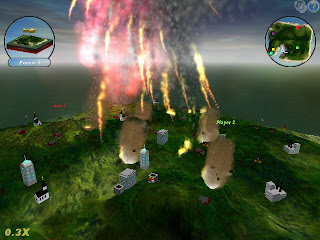
Well, there's the old standby Scorched3D, a game of ballistics and wacky weaponry. While not fast-paced, this is definitely a great time-waster - my 8-year-old son's favorite!
Now, the First Person Shooters (henceforth FPS's) I was talking about:
 The most popular one, and one of the most polished, in my opinion is Wolfenstein - Enemy Territory. Set in World War II and featuring a rich set of features, there are almost too many reasons for this the be the most popular FPS. Features include lots of weapons, a robust online gaming community, multiple player classes, and a level-up system that rewards persistence. Oh, and it will run on older computers that have 3D graphics cards.
The only drawbacks to Enemy Territory are PunkBuster (this program somehow keeps people from cheating) and the lack of a Single Player mode. While PunkBuster works well under Windows, it is difficult to make work under Linux and OS X. That said, if anybody would like a tutorial for getting PB working under OS X or Linux, just tell me so in a reply to this post!
 Nexuiz is the coolest looking of the established FPS's (I'll tell you about some of the less established in a moment), and, frankly, looks as cool as just about any commercial FPS (except Airborn, that one ROCKS!). It's set in a futuristic deathmatch arena, and has lots of cool weapons. Features include stunning graphics, a good choice of avatars, and fast-paced action. The Single Player mode is fun, and the online community has lots of servers with lots of players.
While it will work on a lame computer, you'll get the most out of it if you have a good gaming system.
Now we get to the lesser-known games. Just because they're lesser-known doesn't mean that they're inferior, it just means that there hasn't been much buzz about them.
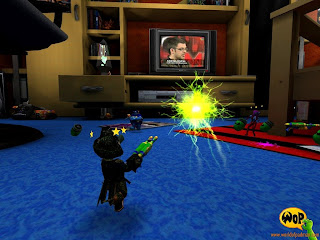 World of Padman, based on an obscure gaming magazine comic strip, is best described as Quake meets Toy Story. That's right, you control toy action figures as they battle to the death with zany weapons. This game is under active development, and seems destined for greatness if it keeps up the momentum.
It has only online play available (Single Player mode is still being developed), and when I went on around 5:30 Central Time, there were lots of servers, but noone was playing! Bummer! I'm hoping that maybe a few someones will see this post and decide to populate the servers. Online Community: ignoring this game would be a tragic waste.
 Another excellent game that's rapidly coming together is Warsow. It has clean, almost simple graphics, and allows for unique freedom of movement - actions include sliding down rails and jumping off of walls - a kind of Parkour Deathmatch. Again, there is not a Single Player Mode, and there were no players online, although there were a wealth of servers just waiting to be played!

That aside, what does a smarmy geek like me play?
Well, there's the old standby Scorched3D, a game of ballistics and wacky weaponry. While not fast-paced, this is definitely a great time-waster - my 8-year-old son's favorite!
Now, the First Person Shooters (henceforth FPS's) I was talking about:
 The most popular one, and one of the most polished, in my opinion is Wolfenstein - Enemy Territory. Set in World War II and featuring a rich set of features, there are almost too many reasons for this the be the most popular FPS. Features include lots of weapons, a robust online gaming community, multiple player classes, and a level-up system that rewards persistence. Oh, and it will run on older computers that have 3D graphics cards.
The only drawbacks to Enemy Territory are PunkBuster (this program somehow keeps people from cheating) and the lack of a Single Player mode. While PunkBuster works well under Windows, it is difficult to make work under Linux and OS X. That said, if anybody would like a tutorial for getting PB working under OS X or Linux, just tell me so in a reply to this post!
 Nexuiz is the coolest looking of the established FPS's (I'll tell you about some of the less established in a moment), and, frankly, looks as cool as just about any commercial FPS (except Airborn, that one ROCKS!). It's set in a futuristic deathmatch arena, and has lots of cool weapons. Features include stunning graphics, a good choice of avatars, and fast-paced action. The Single Player mode is fun, and the online community has lots of servers with lots of players.
While it will work on a lame computer, you'll get the most out of it if you have a good gaming system.
Now we get to the lesser-known games. Just because they're lesser-known doesn't mean that they're inferior, it just means that there hasn't been much buzz about them.
 World of Padman, based on an obscure gaming magazine comic strip, is best described as Quake meets Toy Story. That's right, you control toy action figures as they battle to the death with zany weapons. This game is under active development, and seems destined for greatness if it keeps up the momentum.
It has only online play available (Single Player mode is still being developed), and when I went on around 5:30 Central Time, there were lots of servers, but noone was playing! Bummer! I'm hoping that maybe a few someones will see this post and decide to populate the servers. Online Community: ignoring this game would be a tragic waste.
 Another excellent game that's rapidly coming together is Warsow. It has clean, almost simple graphics, and allows for unique freedom of movement - actions include sliding down rails and jumping off of walls - a kind of Parkour Deathmatch. Again, there is not a Single Player Mode, and there were no players online, although there were a wealth of servers just waiting to be played!
Tuesday, February 12, 2008
Windows XP Service Pack 3 Available
Windows XP Service Pack 3 was released to none of the fanfare that we saw with XP SP2. My evaluation so far? If you're installing it in only one PC, use Automatic Update. If you have more than one, then get the ISO and burn it.
Friday, February 01, 2008
Network Speed Tests

NPAD Servers
NPAD is a very detailed bandwidth test for measuring TCP transfer capabilities. It requires you to have a target computer in mind, and do a rudimentary PING of that target to note the round trip time in milliseconds. Next up, you decide what speed (target rate) you and your target computer are supposed to transfer at, which is the upload speed of the server in a one-way system, or the lowest of the two ends upload speeds for a two-way system.
Pick one that is closest to you or your target:
- University Corporation for Atmospheric Research (UCAR), Boulder Colorado http://npad.ucar.edu:8000/
- Pittsburgh Supercomputer Center, Pennsylvania http://kirana.psc.edu/NPAD/
Web100 based Network Diagnostic Tool (NDT)
 For a more general speed test, forget about that crap at BroadbandReports.com and such and use this test, so generously funded with our taxpayer dollars:
- Oak Ridge National Laboratories, Knoxville, TN http://www.csm.ornl.gov/~dunigan/java/misc/tcpbw.html
- Argonne National Labs, Argonne, IL http://miranda.ctd.anl.gov:7123/
Intel NAS Performance Toolkit
This one is for traffic performance across the Internal network. I haven't tried it out, yet, but be asured I will, and maybe even post screenshots. In the meantime, if you get it, don't hesitate to leace a comment on it, or anything else, for that matter!
Thursday, January 17, 2008
Two more useful utilities - One for Annoyances, and one for Disk Space!
Fix Windows XP Numlock Off at login.
One annoyance that pops up time after time is the toggling of the NumLock key when a user signs in - as in, it's off, and user's don't typically remember to toggle it on before entering their password, thus failing to enter the password and becoming very frustrated! An intreped programmer named Doug Knox has written a program that can help fix this, called, amazingly enough, XP_Numlock.exe.
Free Your Hard Drive of Wasteful XP Hotfix Folders
OK, so, you're running out of hard drive space, or you're really geeky and decided to get rid of any wasteful hard drive usage so that you can get the perfect Defrag with JKDefrag ( now a personal favorite). XP_Remove_Hotfix_Backup.exe is the ideal solution, removing ONLY hotfixes, so it's reasonably safe.
One annoyance that pops up time after time is the toggling of the NumLock key when a user signs in - as in, it's off, and user's don't typically remember to toggle it on before entering their password, thus failing to enter the password and becoming very frustrated! An intreped programmer named Doug Knox has written a program that can help fix this, called, amazingly enough, XP_Numlock.exe.
Free Your Hard Drive of Wasteful XP Hotfix Folders
OK, so, you're running out of hard drive space, or you're really geeky and decided to get rid of any wasteful hard drive usage so that you can get the perfect Defrag with JKDefrag ( now a personal favorite). XP_Remove_Hotfix_Backup.exe is the ideal solution, removing ONLY hotfixes, so it's reasonably safe.
Wednesday, January 09, 2008
Windows Server Tape Drive Replacement Headaches
So your tape drive has failed, it gets replaced with a similar model, but backups still fail? I've run into this several times, and finally found the info I need to set it right!
Assuming it's a similar model, everything should be OK, right? Well, the RSM (Removable Storage Media) does not agree. It still sees the old tape drive as being there; this would have been avoided if the installing tech (sometimes me, more often a Dell rep) would have shut down the server, removed the failed tape drive, then instead of immediately installing the new one instead fires the server back up and lets it realize for itself that there is no drive. THEN you turn it back off, install the replacement drive, turn it back on, and presto! It works!
So you didn't do this, and Ntbackup doesn't recognize the new tape drive (even if it says the right thing, that right thing is likely the OLD tape drive!), don't worry! Let's begin:
Assuming it's a similar model, everything should be OK, right? Well, the RSM (Removable Storage Media) does not agree. It still sees the old tape drive as being there; this would have been avoided if the installing tech (sometimes me, more often a Dell rep) would have shut down the server, removed the failed tape drive, then instead of immediately installing the new one instead fires the server back up and lets it realize for itself that there is no drive. THEN you turn it back off, install the replacement drive, turn it back on, and presto! It works!
So you didn't do this, and Ntbackup doesn't recognize the new tape drive (even if it says the right thing, that right thing is likely the OLD tape drive!), don't worry! Let's begin:
- Go to your server's command prompt and enter:
RSM VIEW /TLIBRARY /GUIDDISPLAY
- Note that the tape drive listed likely doesn't match the one you'll see in your Hardware Manager - go on and look for yourself, because if this isn't the case, then the rest of this likely won't help!
- Rebuild your RSM database:
A. Stop the RSM Service.
B. Backup the RSM databases located at %SystemRoot%\System32\NtmsData and
delete the contents of ntmsdata folder.
C. Restart the RSM Service and reboot the server. This will recreate new,
empty RSM Databases.
D. Put a new tape in, or a tape that may be deleted.
E. Go to the "properties" of the disk inside the physical locations. Uncheck
'Enable Drive'
Hit apply & then check the 'Enable Drive' again
(This was done to reset the Flag since we had renamed the database for RSM) - Go to your server's command prompt and enter:
RSM VIEW /TLIBRARY /GUIDDISPLAY
This should prove that your newly installed tape drive is indeed recognized by the RSM. If it isn't, then you likely have other issues like improper drivers.
Sunday, January 06, 2008
Fun 'n Games

Cursor*10 - this one had me puzzled. But duh, it's a puzzle game? When I read the instructions, I thought they were an awful translation of the author's intent. Instead, it's literally true. This one really makes you think, especially as it plays tricks with time in a way that can be a bit disorienting. In this game you get 10 cursors, each with a 5 second life. You get points by clicking pyramids. Boxes hide stairs, and stairs advance you to the next level. Low, flat, boxes are buttons that make a set of stairs appear. You get 10 cursors that exist simultaneously in the game world, but you manipulate them sequentially, and the previous cursors replay what you had just done.
Monday, December 03, 2007
Your Christmas Present: Useful Free Software!
JKDefrag is an Open Source Windows drive defragmenter, with both a command line and graphical user interfaces available. Rivals Executive Software's Diskkeeper!
CobianBackup is a Windows backup of a different breed - I'll be blogging on this gem more, I'm sure. It can compress and encrypt your information, so it' s HIPAA compliant!
CobianBackup is a Windows backup of a different breed - I'll be blogging on this gem more, I'm sure. It can compress and encrypt your information, so it' s HIPAA compliant!
Subscribe to:
Posts (Atom)